
Healthcare network security means controlling who and what can reach the systems that hold patient records, and proving you have taken reasonable steps to do it. For an Australian clinic, that comes down to four things: a properly configured network edge, strong sign-in controls, tested backups, and a written view of your own risks that tells you what to fix first. That last step is where we work. Veytrix Cyber Security is an independent consultancy focused solely on cybersecurity for GP clinics, medical centres and allied health practices, and our reports are written in plain English.
Key Cybersecurity Priorities for Australian Healthcare Practices
- The Privacy Act 1988 applies to private health service providers of every size, and APP 11 requires reasonable steps to protect patient information.
- Start with the basics the Australian Digital Health Agency lists: updates, passphrases, multi-factor authentication, backups and phishing awareness.
- Secure the network edge (firewall, remote access, Wi-Fi) and keep patient Wi-Fi isolated from clinical systems.
- Rank fixes by what would hurt most if lost: patient records, clinical software and the ability to see patients.
- A written risk assessment turns a vague worry into a prioritised list you can act on and show to others.
What healthcare network security covers
Your network is every connection between computers, servers, cloud services, printers, medical devices, phones and the internet. Network security is the set of controls that decide what can travel across those connections and who can sign in.
The stakes are set out by the Australian Digital Health Agency. It says a successful attack on a healthcare organisation can mean stolen information, lost access to critical systems, disrupted services, reputational damage and fines for negligence. It also describes the health sector as a prime target, with increased threat activity.
For a clinic, the practical meaning is simple. If the network fails or is breached, you cannot open records, book patients, send scripts or bill. The same weaknesses that let an attacker in are the ones that let a mistake spread.
The same idea applies whatever you call it: medical network security, clinic network security or healthcare network security. A solo allied health practice and a multi-doctor medical centre face the same categories of risk. What differs is the number of devices, the number of staff and how much sits in the cloud.
Where clinic networks are exposed
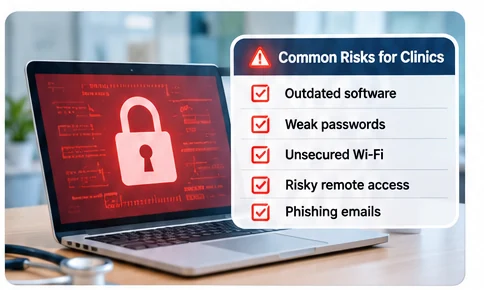
The Agency’s guide for small healthcare businesses names the exposures plainly. Criminals routinely target networks and information systems, internet-connected devices can be reached from anywhere in the world, software coding errors can open holes, and malware can arrive by email or while browsing.
In a typical practice, that translates to a handful of recurring weak points:
- Out-of-date software. Practice management systems, operating systems, browsers and router firmware that have not been patched.
- Weak or reused passwords. Shared logins on reception computers are common in busy clinics.
- Remote access. Doctors logging in from home or a hospital without encryption and a second sign-in step.
- Flat networks. Patient Wi-Fi, printers and clinical computers all on the same network.
- Untested backups. Backups that exist but have never been restored, or that sit on a drive attached to the same network.
- Phishing. One staff member clicking one link.
Not every breach is an attack. The RACGP notes that common breaches among private health providers come from personal information sent to the wrong recipient by email, fax or mail, lost paperwork or mobile storage, and unauthorised disclosures. A good security review looks at these everyday leaks as well as at hackers.
What the law expects of your practice
This section is the part practice managers most often ask us about, so here it is in plain terms.
The Privacy Act and APP 11
The Privacy Act 1988 applies to all private-sector health service providers regardless of size. Australian Privacy Principle (APP) 11.1 requires you to take reasonable steps to protect information from misuse, interference and loss, and from unauthorised access, modification or disclosure.
“Reasonable steps” is not defined as a checklist. The RACGP explains that under the Privacy and Other Legislation Amendment Act 2024, those steps must include both technical measures and organisational measures. Technical measures are things like encryption, secure access controls and system monitoring. Organisational measures are staff training, internal policies and governance.
In practice, that means you need evidence on both sides: settings that are actually configured, and policies and training that are actually recorded.
Data breach notification
Under the Notifiable Data Breaches scheme, an eligible data breach may require notification to the OAIC and affected individuals. Assess the incident promptly and follow current OAIC guidance rather than assuming every incident is automatically notifiable.
The Agency also advises providers to read the OAIC’s four-step data breach action plan for health service providers, and notes there are separate requirements to notify the My Health Record System Operator.
My Health Record
If your practice is registered to access My Health Record, extra data security obligations apply. The RACGP lists auditing and monitoring individual users’ access, regular staff training, risk assessments and a system security policy under the My Health Records Act 2012.
Ransomware payment reporting considerations
Some Australian organisations have additional ransomware payment reporting duties under the Cyber Security Act 2024. Whether these apply depends on the organisation and circumstances. Seek current advice before relying on a reporting deadline or threshold.
The controls that matter most
The Agency and the RACGP agree on a core set. Work through them in this order, because each one limits the damage if the next one fails.
1. Keep software current
The Agency’s first-line advice is to keep software up to date. That includes the operating system, clinical software, browsers and the firmware on your modem or router. Where it goes wrong: the devices nobody thinks of, such as an old reception printer or a router installed years ago by a former provider.
2. Strong passphrases and multi-factor authentication
For systems containing patient records, the Agency recommends passphrases of at least 15 characters mixing upper and lowercase letters, numbers and symbols. It also explains that multi-factor authentication (MFA) protects against phishing and passphrase attacks by requiring something only the user knows plus something they hold, such as a phone.
Where it goes wrong: MFA switched on for email but not for remote access or the clinical system, and shared logins that make it impossible to audit who opened which record.
3. A defended network edge
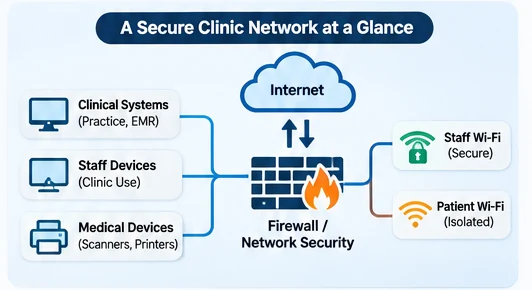
The RACGP says practices should have reliable perimeter controls with multiple layers: firewalls, intrusion prevention and detection systems, VPNs, content filtering and malicious software protection. It adds that any remote access should be protected with encryption such as multi-factor authentication.
The Agency adds that you should change default passwords on modems and routers to long passphrases, encrypt the disks of computers holding health information and consider a VPN for staff working remotely.
Where it goes wrong: a firewall that was installed with default rules and never reviewed, or a VPN that allows any device to connect.
4. Safe Wi-Fi
If business Wi-Fi is enabled, the Agency says to use WPA2 encryption at a minimum, and WPA3 if available, with a long passphrase. For patient or guest Wi-Fi, the RACGP advises a usage policy and isolating it from other networks to limit exposure if it is compromised.
Where it goes wrong: a waiting-room network that shares a segment with the clinical computers, so anyone with a phone is one step from patient data.
5. Backups and a recovery plan
The RACGP expects a documented business continuity plan with information recovery procedures. Critical data should be regularly backed up and validated, with the procedure documented and routinely tested, and backup media should be secure with copies held at an alternative location.
Where it goes wrong: backups that have never been restored. A restore test is the only proof the backup works.
6. People and screens
The Agency states that preventing an attack is not the sole responsibility of the IT department: everyone plays a part. For staff that means not responding to phishing emails, texts and calls. At the consulting room level, the RACGP suggests clearing screens between patients, positioning monitors for privacy, using password-protected screensavers and logging off when leaving a computer.
7. Cloud and overseas providers
The RACGP notes that disclosing information to an overseas recipient, including by using cloud computing companies, must first go through a thorough risk assessment. If your practice runs email, file storage or clinical tools through Microsoft 365 or another cloud service, that review belongs in your risk assessment.
How to decide what to fix first
Most small practices cannot do everything at once, and they should not try. A sound order of priority follows from three questions.
- What would stop you seeing patients? Clinical software, the server, internet access, the backup. Protect these first.
- What would trigger a notifiable breach? Anywhere patient information sits: the practice management system, email, shared drives, laptops, USB sticks, cloud storage.
- What is the cheapest control that closes the biggest gap? Turning on MFA, patching a router and testing a restore typically cost far less than anything else on the list.
To apply these, build a simple asset list: every computer, server, router, printer, medical device and cloud service, with who uses it and what patient data it touches. Then mark each against the controls above. The gaps that sit on assets holding patient data and lacking MFA, patching or a tested backup go to the top.
This is the point where an outside view helps. Staff who run the practice every day tend to see what works, not what is exposed. A written assessment gives you a ranked list, plain-English explanations and evidence of the reasonable steps you have taken under APP 11.
How Veytrix can help
Our Healthcare Cyber Security Assessment is built for GP clinics, medical centres and allied health practices. We review your IT security, identify weaknesses and report back in plain English with prioritised remediation guidance, without legal jargon. We specialise only in cybersecurity, we are independent and software-agnostic, and our compliance reviews cover the Privacy Act and APP 11 as well as My Health Record.
If your main concern is your privacy obligations, the Privacy Act and APP 11 Security Assessment looks at those duties directly. If you access My Health Record, the My Health Record Security Readiness Assessment covers that system’s requirements. We also offer vulnerability testing, cloud and Microsoft 365 security reviews, data breach readiness assessments, remediation support and retesting. Fees are project-based and depend on scope, asset count and the level of assessment. You can see the full range on our cybersecurity services page.
If an incident happens
Act on a short, rehearsed plan, not on instinct.
- Ransomware: call the Australian Cyber Security Centre 24/7 hotline on 1300 CYBER1 (1300 292 371). The Agency advises not paying the demand.
- Contain and assess: follow the OAIC’s four-step action plan for health service providers to contain and manage the breach.
- Notify: if serious harm is likely, notify the Privacy Commissioner and affected patients. If you use My Health Record, notify the System Operator as well.
- Recover: restore from your tested backups, and write down what happened for your review afterwards.
Write these steps and the phone numbers into your continuity plan, and keep a printed copy, because your computers may be the thing that is down.
FAQ
What is the first thing a small clinic should do for network security?
Start with the Agency’s basics: update software, use long passphrases, turn on multi-factor authentication, back up regularly and train staff to spot phishing. Then write down what systems hold patient data. That list shows where the controls matter most.
Does the Privacy Act apply to a small allied health practice?
Yes. The Privacy Act 1988 applies to private-sector health service providers regardless of size, and APP 11 requires reasonable steps to protect patient information. Those steps cover technical measures and organisational measures such as training and policies.
Should patient Wi-Fi be on the same network as clinical computers?
No. The RACGP advises isolating practice Wi-Fi from other networks so a compromise has limited reach. Use a separate guest network with its own strong password and a usage policy.
How often should backups be tested?
The RACGP says the backup procedure should be documented and routinely tested, with copies kept at an alternative location. Doing a restore test on a schedule you set and record is the most direct way to know the backup will work when you need it.
Sources
- Fundamentals of cyber security in healthcare, Australian Digital Health Agency
- Cyber security guide for small healthcare businesses, Australian Digital Health Agency
- Managing cyber security threats, Australian Digital Health Agency
- Prevention is better than the cure, RACGP
- Privacy and information security, RACGP
- Network perimeter controls, RACGP
- Information security in general practice, RACGP
- Cyber Security Act 2024, Federal Register of Legislation
- AUSCERT Week in Review for 6th June 2025
Next step: Read our Essential Eight guide for healthcare practices, or explore a healthcare cybersecurity assessment with Veytrix.