
A busy GP clinic depends on reliable clinical software, patient records, appointment systems, email and connected devices. If even one critical system becomes unavailable, reception staff may struggle to book patients, clinicians may lose access to important information and the practice may face significant disruption.
Cybersecurity is therefore more than installing antivirus software. It is about controlling access to patient information, keeping systems available and making sure your practice can recover when something goes wrong. This guide outlines practical steps for Australian GP clinics, medical centres and practice managers.
Key cybersecurity priorities for GP clinics
- Know which systems store or access patient information and who is responsible for them.
- Use multi-factor authentication (MFA), unique staff accounts and timely software updates.
- Separate guest Wi-Fi from clinical systems and secure remote access.
- Maintain protected backups and test that important records can be restored.
- Train staff, document incident response steps and prioritise gaps by clinical impact.
Why GP clinics need a practical cybersecurity plan
General practices handle sensitive health information and often rely on a mixture of cloud software, local computers, medical devices, third-party IT support and online services. A weak password, an unpatched computer or a poorly configured remote-access service can create a pathway to patient information.

The consequences may include interruption to consultations, loss of access to records, privacy incidents, recovery expenses and loss of patient confidence. The goal is not to eliminate every conceivable risk; it is to take reasonable, proportionate steps and be able to demonstrate how those steps are maintained.
Common cybersecurity risks in GP clinics
Shared accounts, reused passwords and missing MFA can make unauthorised access easier.
Unpatched computers, browsers and routers may expose known security weaknesses.
Fake invoices, password-reset messages and malicious attachments can trick busy staff.
Guest devices should not be able to access clinical workstations or internal systems.
A backup that has never been restored may fail when the practice needs it most.
IT and software vendors may hold privileged access that needs clear oversight.
Where a clinic cyber incident can begin
What Australian privacy obligations mean for GP clinics
Privacy Act 1988 and APP 11
Private-sector health service providers are generally covered by the Privacy Act regardless of annual turnover. Australian Privacy Principle 11 requires reasonable steps to protect personal information against misuse, interference and loss, as well as unauthorised access, modification and disclosure. The appropriate steps depend on the practice's circumstances, systems and risks.
Security measures should include both technology and everyday procedures: access restrictions, staff training, secure disposal, monitoring and clear responsibilities. See the OAIC's APP 11 guidance.
Notifiable Data Breaches scheme
Not every security incident is automatically notifiable. Where an eligible data breach is suspected, the practice should promptly contain and assess the incident and determine whether notification to the OAIC and affected individuals is required. See the OAIC Notifiable Data Breaches guidance.
My Health Record
Practices registered to use My Health Record should also understand their applicable security, access and incident-management requirements. Maintain appropriate policies and check current guidance from the Australian Digital Health Agency.
Start with an inventory and clear ownership
List the systems that handle patient or business information: clinical and practice management software, email, cloud storage, desktops, laptops, servers, Wi-Fi equipment, printers, medical devices and third-party portals. For each item, record its owner, administrator, support provider, update responsibility and recovery method.
Ask suppliers who can access your systems, how their access is protected, how quickly they will notify you of an incident and who is responsible for restoring data. These details should be documented rather than assumed.
Seven essential cybersecurity controls for GP clinics
1. Secure accounts with MFA and least privilege
Enable MFA wherever supported, particularly for email, remote access, administrator accounts and cloud services. Give staff only the access required for their role, remove departed users promptly and avoid shared administrator credentials.
2. Patch computers, applications and network devices
Keep operating systems, browsers, clinical applications and router or firewall firmware updated. Identify unsupported devices and create a replacement or isolation plan where immediate replacement is not feasible.
3. Protect the network and remote connections
Review firewall settings, remove unnecessary internet-exposed services, use secure remote access and separate patient or guest Wi-Fi from internal clinical systems. Change default administrator passwords on network equipment.
4. Use endpoint protection and encryption
Deploy appropriate endpoint security on supported devices, configure it correctly and monitor alerts. Use device encryption where suitable, particularly for laptops or other equipment that may leave the practice.
5. Maintain and test backups
Back up critical information according to the practice's clinical recovery needs. Protect backup copies against accidental deletion and ransomware, and periodically test restoration. Confirm which records and services a vendor can restore and how long recovery is expected to take.
6. Train staff to report suspicious activity
Teach staff to recognise phishing, unusual login prompts, fake payment requests and unexpected attachments. Provide a simple way to report concerns without delay, and rehearse what to do when a suspicious email or incident is discovered.
7. Document policies and incident responsibilities
Keep concise procedures for user access, software updates, backups, supplier access, patient-information handling and incident response. Assign owners and review these documents when systems or staff change.
What a secure clinic network looks like
Network segmentation limits which systems can communicate with one another. For example, patient Wi-Fi should be isolated from clinical workstations and practice servers, while remote staff should use approved, strongly authenticated access methods.

Separate patient-facing access from clinical systems
GP clinic cybersecurity checklist
Use this as a starting point for an internal review, not as a compliance certification.
| Area | Question for the practice | Evidence to keep |
|---|---|---|
| Accounts | Is MFA enabled for email, remote access and privileged accounts? | Configuration screenshots and account review records |
| Devices | Are systems supported and patched regularly? | Asset list, patch reports and exceptions |
| Network | Are firewall rules reviewed and guest Wi-Fi isolated? | Network diagram and configuration review |
| Backups | Can critical information be restored from protected backups? | Backup status and dated restore-test results |
| People | Do staff know how to report phishing or a suspected breach? | Training records and response instructions |
| Suppliers | Are support, access and incident responsibilities documented? | Contracts, access register and escalation contacts |
| Governance | Are risks prioritised and actions assigned to an owner? | Risk register and remediation tracker |
What to do if your GP clinic suspects a cyber incident
- Contain: Contact your IT or incident-response provider immediately. Isolate affected systems when advised and avoid destroying evidence.
- Protect clinical operations: Activate your continuity plan so staff know how to manage appointments and patient care safely.
- Assess: Determine what happened, which systems and information are affected, and whether an eligible data breach may have occurred.
- Notify where required: Follow applicable OAIC and My Health Record reporting requirements and obtain appropriate professional advice.
- Recover and learn: Restore verified systems and data, record the timeline and close the underlying security gaps.
For cyber incident advice in Australia, consult the Australian Cyber Security Centre. Keep key contact numbers available offline in case email or practice systems are unavailable.
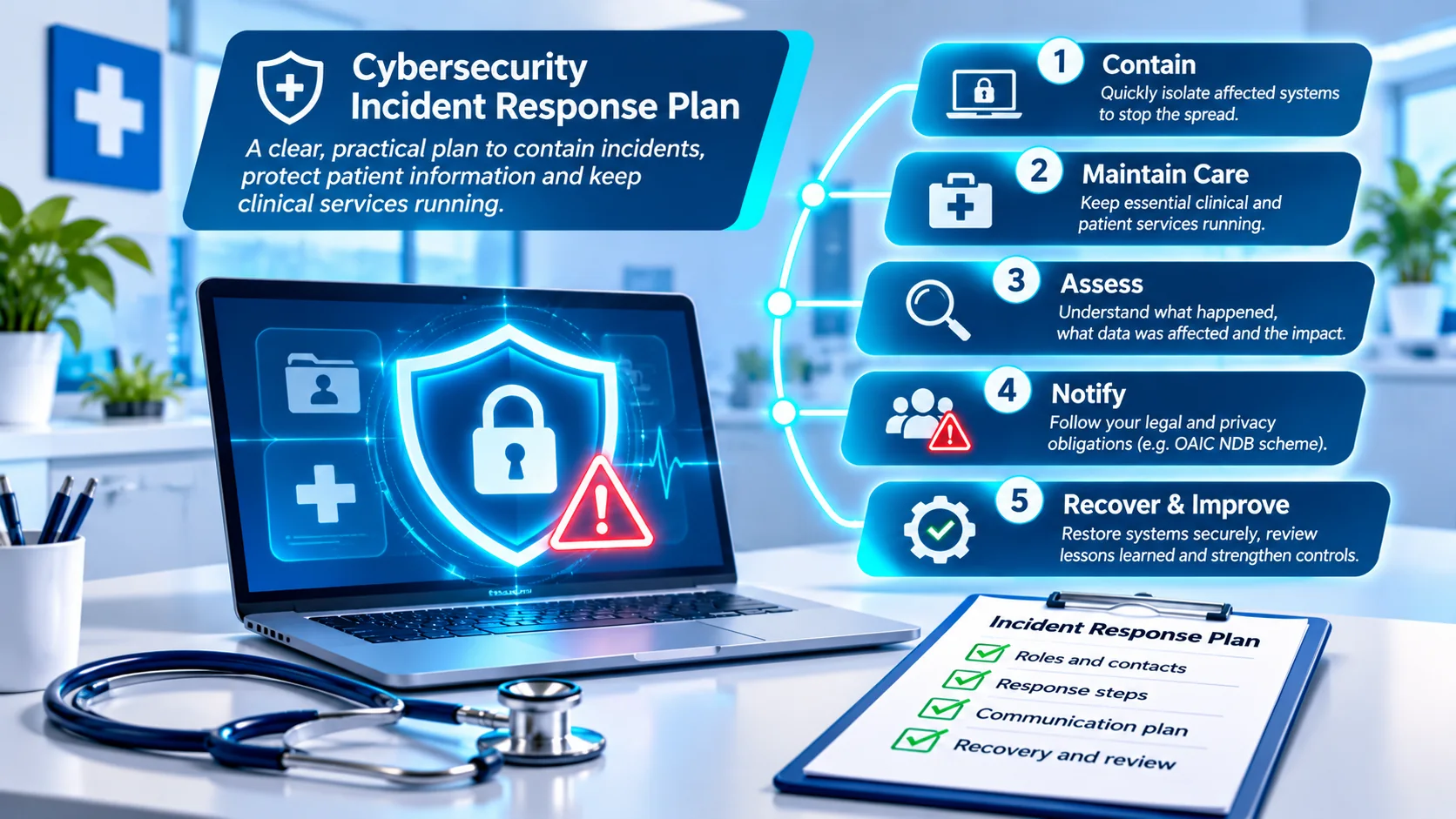
Five steps to guide your response
How to decide what to fix first
Not every improvement needs to happen at once. Start with the systems whose failure would have the greatest impact on patient care or sensitive information, then consider how likely a problem is and how quickly it can be reduced.
- Urgent: Exposed remote access without MFA or an unsupported internet-facing system.
- High: No verified restoration process for critical patient records.
- Medium: Incomplete staff training or undocumented supplier access.
- Ongoing: Scheduled reviews of policies, user accounts and security controls.
Document each finding, the responsible person, a target completion date and evidence that the issue has been addressed. An independent assessment can help validate actual technical controls and produce a practical remediation plan.
Frequently asked questions
Does a small GP clinic need cybersecurity measures?
Yes. Small practices still hold sensitive patient information and depend on digital systems. Appropriate controls should reflect the practice's risks and legal obligations.
Is antivirus software enough to protect patient records?
No. Endpoint protection is only one layer. Strong authentication, patching, network controls, tested backups, staff training and incident preparation are also important.
Should patient Wi-Fi be separate from the clinic network?
Yes. Separating guest Wi-Fi from clinical systems helps reduce the chance that a compromised or untrusted device can reach sensitive internal resources.
How often should a GP clinic test its backups?
Testing should be scheduled according to the importance of the data, system changes and recovery needs. Record test results and correct any failures.
Does a cybersecurity assessment guarantee compliance?
No. An assessment can identify weaknesses and provide evidence to support risk management, but it does not guarantee compliance or prevent every incident.
Need help assessing your GP clinic's cybersecurity?
Veytrix Cyber Security helps Australian GP clinics, medical centres and allied health practices understand their cybersecurity exposure and prioritise practical improvements. We offer scoped assessments, with onsite services in Sydney and remote support across Australia.
Request a consultation →Further reading and official guidance
- Australian Cyber Security Centre — cyber security guidance
- OAIC — Australian Privacy Principle 11
- OAIC — Notifiable Data Breaches
- Australian Digital Health Agency — Cyber security
Important: This guide provides general cybersecurity information only. It is not legal advice, a technical security audit, a regulatory compliance certification or a guarantee against cyber incidents. Verify current requirements and seek advice appropriate to your practice.